
 ATMs & Locations
  Contact Us
  Rates
Rates 
MessagePay: Your Quick Loan Payment Solution
Life can get busy, and sometimes loan payments are forgotten. To help you avoid late fees, METRO is excited to introduce MessagePay, a handy tool for those urgent payment moments. With MessagePay, you can quickly and affordably make payments to steer clear of late penalties.
Make Easy Mobile Payments
MessagePay revolutionizes your loan payment process. This innovative platform allows you to make payments easily from your mobile device through a text message, using any external bank account. It’s perfect for ensuring timely payments, especially when you’re pressed for time.
Avoid Late Fees
Using MessagePay isn’t just about making a payment; it’s a smart way to save money and maintain your account’s good standing. The $5.99 convenience fee for each loan payment via MessagePay is a cost-effective alternative to a $30 late fee, giving you peace of mind and financial flexibility when you need it most.

Setting up Your Account
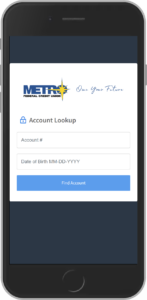
1. Verify Your Account
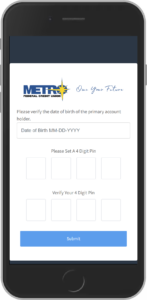
2. Create Your 4 Digit PIN
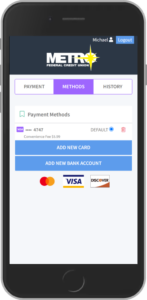
3. Add a Payment Method
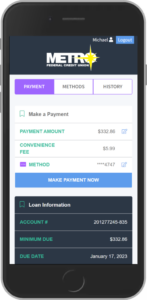
4. Make a Payment!
How MessagePay Works
Once you sign up for MessagePay, you’ll get a text message informing you of the amount due on your loan. You’ll be able to review your payment options, or you can opt out of our text message service by texting “STOP.”
The link will take you to a portal where you will be asked to verify your account with your account number and date of birth.
When you verify your account for the first time, you’ll have to set up the following:
- 4-Digit PIN: Once you’ve entered your account number and date of birth, you’ll be prompted to create a 4 digit pin. Store this information in a secure location; you’ll need your PIN to verify future payments.
- Preferred method of payment: To make a payment you will have to add a preferred form of payment in the portal. You can do this by selecting “Add New Debit Card” or “Add New Bank Account” which will prompt a secure website for you to input your information. If completed correctly, there will be a message stating “Payment Method Success” and you’ll be redirected to the payment portal.
- Once your account has been successfully verified, you’ll be directed to the payment portal where you will be able to see all of your loans and will also be able to select your preferred payment method.
MessagePay Benefits
- The transaction fee to use MessagePay is only $5.99.
- Encrypted information guarantees your information is secure.
- Convenient ways to pay from an external account: text, website, and online and mobile banking.
- Payments are accepted from checking accounts, savings accounts and debit cards.